Best Blogger Tips Best Blogger Tips

This is default featured slide 1 title

Go to Blogger edit html and find these sentences.Now replace these sentences with your own descriptions.This theme is Bloggerized by Lasantha Bandara - Premiumbloggertemplates.com.

This is default featured slide 2 title

Go to Blogger edit html and find these sentences.Now replace these sentences with your own descriptions.This theme is Bloggerized by Lasantha Bandara - Premiumbloggertemplates.com.

This is default featured slide 3 title

Go to Blogger edit html and find these sentences.Now replace these sentences with your own descriptions.This theme is Bloggerized by Lasantha Bandara - Premiumbloggertemplates.com.

This is default featured slide 4 title

Go to Blogger edit html and find these sentences.Now replace these sentences with your own descriptions.This theme is Bloggerized by Lasantha Bandara - Premiumbloggertemplates.com.

Best Tips 2012 title

This blog gives you the best knowledge and tips which you want , example AdSense, Technology,Computer, Affiliate, Buyandsell,Apple,Android, and much more

Thursday, 11 October 2012

Do you find Android Phones difficult to operate?


Android phones have become more popular amongst people today. Recent survey shows that Android phones have overshadowed iPhone and above all it is accessible with every mobile carrier. People who are new to Android Phones would often find it difficult to get along with it. There are critics who have often pointed out some defects but if the users would know how to make the most out of then they would find it to be more user friendly. Wondering how? Keep reading this article to understand certain tips and tricks which would make you realize that use of Android phones is not that difficult.

How to manage your battery life?

I have read in many reviews that Android phones have poor battery life. You can’t deny this fact but these were with old models or who knows it may be with newer models too. Luckily there are many tools available which would help you manage your battery life. Software’s like power saver would allow you get more battery life.
There are some features on the Android phones which are not required. Features like Bluetooth, Wi-Fi and GPRS which would end up your battery getting low if they are used regularly. Keeping this in mind the company have manufactured Android v1.6 which contains tools that allows switching these features off when it’s not required in order to grow your battery life. You need to get a widget which you can store on your Android phone desktop which would allow you to turn off or on these features with just a touch of a finger. There are several other applications which allow you to toggle ON and OFF options so that incase if any application needs these features it can turn on.
There’s another annoying thing with regards to managing your battery life on Android phones is that the default battery meter only displays certain color: : green, yellow and red which is a battery life indicator. This makes it difficult for a user to know if it’s the application itself which is consuming the battery life. Battery Meter Lite software is a freeware which would help you know about how much battery is still remaining in your cell phone. When you enable this application an icon will appear which will show how much battery is remaining just like laptop. This helps the user keep informed about when his battery is going to get low.

How to manage tasks?

Just like a normal laptop freezes your android phone too freezes due to many tasks working in the background. A user would definitely want to know which tasks are operating and also know how to stop them if they are not to be used. An application called System Panel Lite provides information to the user as to which applications are running and which are inactive but are cached in the processor.

Tired of default messaging?

Some users like me would hate default messaging application. There is one application which I came across Handcent SMS which is also a freeware application replaces your default messaging application. This application allows you to visualize the history and the current conversation when you are sending SMS. It also allows you to send MMS and also allows saving of MMS attachments. All you need to do is set this application as default on your Android Phone.
Android phones are user friendly once you get to know how to operate them. Yes, for beginners it may be bit difficult but few applications would help you know Android phones. I have found little information which can be useful for you. There are more applications available which you can find out from your local shop or on the internet. Download your favorite application which would make your usage easier.

Author Bio:

"Matthew Anton" is a professional online marketer offering search engine optimization services through Backlinksindexer 

A Beginner's Guide to Computer Viruses

Computer viruses are software programs that spread between computers and interfere with computer operations. Computer viruses have the potential to corrupt or even destroy computer data, use your email account to transmit the virus from your computer to those of your email contacts and erase the entire contents of your hard disk drive.

Computer viruses tend to be spread through messages sent over instant messaging programs and through attachments contained within email messages. Computer viruses may also be spread through Internet downloads. They can be contained within downloads of all types, including pirated software (software that has been copied and passed on without authorisation). For this reason, you must take care not to open email attachments from untrusted sources and download programs from lesser known websites.

There are many different types of computer viruses, including:

Resident Viruses
Resident viruses affect your computer's Random Access Memory (RAM). They corrupt
(make changes to) the files and programs present on your computer system.

Boot Viruses
Boot viruses affect a part of your computer's hard disk drive known as the boot sector. The boot sector contains the information necessary to start up (boot up) your computer. Hence, computers affected by this virus may not start up as they should do.


Direct Action Viruses
Direct action viruses replicate themselves and infect the files in your computer's directory. They function whenever your computer is started up.

Directory Viruses
Directory viruses change the pathways your computer needs to go down to access files. When you open up the affected files, you will be running the virus without being aware of it.

Overwrite Viruses
Overwrite viruses delete information contained within the files that they infect, rendering the files useless. These viruses can only be eliminated by deleting the infected files.

File Infectors
File infectors are the most common
computer viruses. These viruses infect programs and executable files (files that tell your computer to carry out tasks in accordance with the instructions contained within them). These viruses find their way onto your computer through certain types of freeware (free programs) that you may have downloaded from the Internet.

Companion Viruses
Companion viruses accompany the files that already exist on your computer. They target files that are regularly used, such as those involved in starting up your operating system. Some companion viruses disguise their presence by allowing you to open the file that they accompany as normal. However, the viruses will be functioning alongside the file.

FAT Viruses
FAT is an acronym for File Allocation Table, a piece of software that enables your operating system to interact with the hard disk drive and vice versa. When FAT viruses infect your computer, information can become lost. This is because the FAT system is essential to the storage and retrieval of data placed on the hard disk drive. In the worst case scenario, your hard disk drive may not work as it should do.

The threats presented by these computer viruses render the use of anti-virus software essential. Your computer may have come with anti-virus software installed. However, if it did not, you will need to purchase and install this software yourself. Anti-virus software will prevent viruses from infecting your system and will detect and destroy any viruses that have already infected your system.


Avast a Total Internet Security – Features of Avast!


Basically the antivirus software is used to check or to stop the malware. Computer security, including security of the social engineering system, is usually offered in products and services of antivirus software companies. Avast is an internet security program that developed by ALWIL Software. The software given name as “Avast” because the name Avast is an ellipsis of Anti-Virus – Advanced Set i.e. Avast!
When it comes to picking a computer security application, mostly Avast appears first in the mind. The application designer operated by its Group system aims hard to protect the digital world from a number of harmful uses.

Features of Avast! -Totally internet security.

1.    Avast! -  A Safe zone, Private, secure, isolated browser:

What you want for internet shopping and banking… or browsing websites. No other applications can see it, and it results in no record.

This function makes the area separated from all resources operating on your pc, so no key logger or malware can acquire in. Thus, if you do your internet banking, online purchasing, or any other delicate dealings within this area, no one and nothing can see or monitor your action. Avast! Safe Zone keeps every risk youth.

2.      Avast! Sandbox: Virtualization, for greatest security


Mainly helpful when viewing high-risk sites or exploiting dubious programs, whether unintentionally or purposely. Strikes focused on your device thus disappear.

Avast! Sand pit allows you to build a secured exclusive environment inside your objective machine. If the application is included within the Avast! Sandbox, no damage can absolutely and damage your computer. Avast! Sandbox keeps every risk kept in the exclusive space.

3.      Avast! Firewall: quiet protection as of hackers


This can help besides identifying fraud – it prevents online cyber criminals and other unwanted entry efforts to your PC, to keep your data where it connected – safely and securely.

Avast! The software uses heuristic and attitudinal research and a white-colored record of security programs to narrow dubious action. Automatically! The only factor you need to do is to choose if you are at the house, at perform, or in the community in the preliminary immediate. Or if you are a Dork, you can absolutely modify the professional configurations however you like. Go ahead!

4.      Avast! Anti-spam: Filters junk/scams from your mail


If you are looking for growth enhancement’ provides or a observe that you have won the sweepstakes, find them now in your Trash Email directory. This anti-spam function prevents both junk and innovative fishing efforts, to keep you from simply clicking harmless hyperlinks that actually can cause harm.

Avast! Antispam component examines every inbound e-mail on various requirements to figure out whether it is genuine. This research is centered partially on a 'Blacklist' and 'White list' containing the details of senders from who e-mails should always be noticeable as junk, and of known and reliable senders. The narrow performs as a plug-in to Ms Perspective and a common POP3/IMAP4 proxy for other e-mail customers.

Author Bio:

"Jenny Gates" is a contributor to CouponsForFree.US She suggests you Avast Free Coupons for buying online Avast antivirus software and its products for internet as well as your PC security.

Monday, 8 October 2012

Increase Backlinks to your Website or Blog

All search engines like Google,Yahoo , Bing are the main source of visitors for a blog or website. some other good source are Digg or stumble upon but they are secondary option because everyone search first on Google or other search engines. the main question is How to Increase Backlinks,below these are some ways by which backlinks to your site will increase.


1. Link Exchange : First and the most common method is link exchange you can exchange links with your fellow bloggers or website owners this will increase back links to your websites.


2.Submit your article on Social Bookmarking website : Social bookmarking is the most important part of blogging, sites likes stumble upon, Digg , Reddit can give you many visitors which are from different countries.


3.Join Forums : There are some great forums which can increase your back links forum like digital point or warrior forums helps you to increase back links to your website.


4.Quality Content : Write quality content then people will surely link to your website because of good writing and always write articles with good explanation then many people refer your website to others.


5.Promote your Articles :You can post your blog articles on directories like Go articles and Ezine Articles, So that other webmasters can post them on their websites or blogs.


These are some few Tips by which you can Increase Backlinks to your website or blog.
Share your Tips also on comments

Monday, 1 October 2012

10 Tips For Preparing Yourself For an Interview

Preparation is a big part of the interview process. You will, or you should, spend more time getting ready for the interview than you will at the interview itself. This preparation includes getting to know more about the company and the position you are applying for, and preparing yourself to explain how your assets make you the best person for the position. And of course, there is the time it takes to make yourself presentable. Going to the job interview can be a stressful situation for many. The best way to help relieve this stress is to maintain a positive attitude and be prepared. Consider the following ten tips as you prepare for your interview.
1. Be Positive. Go into the interview confident that you have prepared well. This does not mean conveying a "know-it-all" attitude, with a cocky demeanor. Be self-assured and look forward to the occasion as an opportunity for you to demonstrate what you know and how it will meet the employer's needs.
2. Be ready for the questions you will likely be asked.  
Think of the answers you want to give. Although you will never completely know in advance every question they will ask you, there are questions that get asked in almost every interview. Learn what they are and try to anticipate what the others might be. Interview questions are usually sourced from the job posting. If they are looking for a particular skill set, make sure you can explain how you will meet that expectation.
3. Know why you want to work for their company.             
                     Do your best to obtain information about the company before the interview. Do some research, using their website, scanning through annual reports if they publish one, being familiar with projects they are currently work on. This will help you to couch your answers in the context of what their core business is all about.
4. Study the job description and know about the job. 
                                            Most job postings have a list of core duties/responsibilities as well as what qualifications are required. Study these well and frame your answers accordingly.
5. Know what you have to offer -
                                                That is, what education/training you have had and what work experiences you have done that makes you the ideal candidate for the position. Be thorough in your self-assessment, think broadly about all you have learned and experienced. You may surprise yourself with what skills you have acquired previously.
6. Come to the interview with a prepared list of references 
                          That can be handed over to the interviewer. This should include names, addresses, telephone numbers and email contacts, and make sure you have asked permission from those on the list in advance.
7. Take copies of your resume with you to the interview. 
                         In most cases, the interviewer will have your resume already, but it never hurts to have a back up copy just in case. And be sure it is the most current and relevant resume for the position the interview is for.
8. It is very important that you make sure you get to the interview location on time, and that means well in advance. Know where you are going and how long it will take you to get there.


Tuesday, 18 September 2012

Apple Is “Completely Blown Away” By iPhone 5 Preorders


After the iPhone 5 preorders sold out in just under an hour, Apple spokesperson Nat Kerris told AllThingsD the following in regards to the massive amount of iPhone 5 preorders:
Pre-orders for iPhone 5 have been incredible. We’ve been completely blown away by the customer response.
This quote comes after Apple sold their entire preorder inventory in the wee hours of this morning. Some sources have said that the iPhone 5 sold out over 40 percent quicker than iPhone 4S preorders did last year. Keep in mind, the iPhone 4S sold out pretty quickly as well. In fact, over 1 million were sold during the first days of preorders.
Unfortunately, Nat didn’t release any sales numbers alongside her statement, so we may have to wait a bit for those numbers to surface. Needless to say, they were likely much higher than last year’s iPhone 4S launch.
Just as a personal note, I went to preorder two phones this morning: one for myself and one for a family member. Needless to say, I was extremely impressed with how well Apple handled this year’s iPhone preorder session. I didn’t experience any crashing when preordering my iPhone 5, unlike last year when Apple’s site crashed multiple times during the first night of iPhone 4S preorders.
Good luck getting your iPhone 5 next week, line waiters.

Monday, 3 September 2012

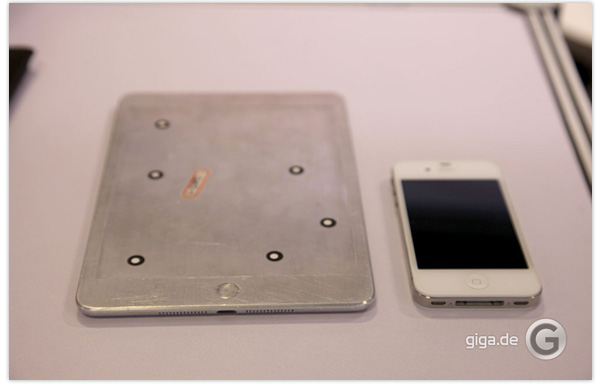
Physical iPhone 5 & iPad mini mockups surface at IFA

Physical mockups of what are purported to be Apple’s upcoming iPhone 5 and iPad mini devices have surfaced at the IFA 2012 consumer electronics trade show in Berlin. Presumably based on a combination of leaked parts and schematics, the mockups were created by case manufacturers to test out their new accessories.
iPhone 5 physical mockup Of the two mockups, which have been produced by different companies, the iPhone 5 version looks more like a finished product. The Verge shot the following video comparing its design to an iPhone 4S.


The following photos of the iPad mini mockup were taken by German site giga.de via 9to5Mac. Although the mockup is constructed entirely from metal, you can at least get a sense of the device’s possible size and thickness.
Apparently, while both of the case companies were happy to show off their mockups at the show, neither was willing to be named.
iPhone 5 physical mockupAccording to the latest reports, the next-generation iPhone is expected to be unveiled at an Apple media event on the 12th of September, which will be followed by an iPad mini announcement in October.

[Rumor] Apple to use A6 chip processor in new iPhone


Want more iPhone rumors on this extended weekend? How about this; photos surfaced on a Chinese forum late last week of what appears to be the internal logic board of the upcoming iPhone, and they bear an A6 designation on the chip.
Whether Apple will incorporate this new A6 chip or an mild upgrade the A5X chip of the New iPad is still being debated on the Apple web, but the clear markings of A6 on the logic board’s main chip in these photos would indicate Apple is planning to roll out an entirely new chip technology for its next iPhone, if they prove to be authentic.

In that case, the next-gen iPhone could pack a much more powerful quad-core CPU processor, and could benefit users in areas such as mobile gaming, videos and handling applications.
The iPhone 5 (or New iPhone) is also expected to include a larger 4″ screen, 4G LTE connectivity and a new form factor. We’ll hopefully find out for sure within in the next couple of weeks.

Sunday, 2 September 2012

How To Sell On eBay For Beginners

Selling on eBay is not brain surgery. Anybody is capable of doing it. Nonetheless, there are lots of challenges a beginner eBay wanna be vendor faces; Whats the best thing to sell on eBay? Where to find items to sell on eBay? How to price them?… and so on.
So, it is important to at least learn the basics on selling on eBay before jumping into it.
If you are a beginner and don’t know how to sell on eBay, the following 8 tips will help you become a successful eBay vendor who knows how to make money on eBay.


Spy On Power Sellers Who Sell The Same Thing

No matter what you decide to sell on eBay, it is a good idea to look around to see if anyone else is selling it as well. Doing so will stop you from proclaiming that your product is without a doubt hard to find or a rare product.
Learn From Power SellersA simple way for beginners to start selling on eBay is to simply use other people’s listings and prices as an outline. Learn how other sellers summarize the product – would their description of the product appeal to you as a buyer and entice you to buy the product?… Keep a close eye on their auctions and basically monitor their progress, so you can see the final price that the item is sold for. That alone will give you lots of know-how about the selling on eBay and how the market works.

Describe Your Goods The Best Way You Can

When it comes to describing your product, make sure you take your time to describe it precisely, devoid of a lot of hype, bogus statements or outrageous claims. If perhaps a potential buyer comes to check out your listing, it is more than likely that he or she knows a bit about the product and in some cases he or she may even now more about the item that you do.
You do not want to drive away a potential buyer by falsely describing your items.
In the event that you really are clueless about the product, simply say it. There is absolutely no shame in acknowledging that you do not know a lot when it comes to a product. Honestly, it is much better and more honest to state your ignorance and summarize it the best way you can, rather than making things up.
Good Titles For eBay Listing

Write Titles That Stand Out From The Rest

The title of your product listing is perhaps the single most important part of it all. The title of your product description is the first thing that potential buyers see, make sure it is not the last! Take advantage of all the rooms and add as much buzz-words as you possibly can. It doesn’t necessarily have to always be grammatically correct.
It is not advised to misuse the space by using words such as COOL or WOW. The fact is that buyers do not search for products on eBay using keywords like these. Instead of wasting space with words that nobody will ever use to find the kind of product you are selling, use words that people might actually use. Again, look at other successful sellers and learn from them.

Put Your Item In A category It Actually Belongs To

I see this all the time, people add their items to categories that have nothing to do with what the actual item is. Buyers narrow down their search with categories as well and if your item is placed in the wrong category, chances are they will never see your item. Take extra time to ensure your product is listed in the appropriate category.

Be Sure To Add Pictures

Photos are amongst the most important components of a great eBay listing. Always make certain you use really good and clear pictures of your products. Pictures that are not in focus and/or are taken from a big distant usually do not help your products.
It may be time intensive to take pictures of each product you want to sell and then upload them to eBay, nonetheless, pictures alone can help sell your product. Remember “One picture is worth a thousand words…”.
Pricing Your Product

Price It Right

In terms of pricing your goods, again use other sellers and their pricing as a guide line. Pricing your products to high is not going to help you sell the product. It is a well-known psychology of marketing. When it comes to auctions, no matter how bad a potential buyers want a product, if the price starts off to high, chances are the buyer will back up.
But, the beauty of auctions is that you start off the bidding really low to lure people in and once they have their first bid placed, they are likely to play along and drive the price up. However, if there is a product that you seriously don’t wish to sell beneath a specific price tag, take advantage of “reserve” option to place a reserved price on your product. That is a good way to ensure you actually make money on the product.
That said, please remember this can typically drive buyers away, therefore utilize it whenever it is truly appropriate.

Provide Reasonable Shipping And Delivery Prices

When there is a product which is lightweight and needs not much additional packaging or safety, it is wise to keep shipping price down. Almost nothing drives away prospective customers more quickly than when a seller charges an enormous amount of money for a product that can be shipped effortlessly. Make sure you do include shipping prices in each and every item description you have listed for sale.
It really is foolish to not include shipping prices in product description. It can easily drive away potential buyers simply because a buyer may not want to spend time trying to get in touch with you to ask about the shipping costs. Plus, you will have lots of work to do, so you certainly don’t want to be bound responding to messages that could have been avoided if the shipping costs was included in the listing of your item.
Also, don’t forget to provide alternative shipping options to buyers. Lots of buyers tend not to mind waiting around to receive the item they bought because they may not actually need the item right away. So, they won’t mind paying cheaper fees for shipping and waiting an extra day or two.

Be An Honest Vendor

Tell the truth. In the event that something goes completely wrong, do let your buyers Know whats happening, whether it was your fault or not. Most people are understanding and realize that things happen. Tell them the truth and treat them as you would want to be treated.
Honesty is one of those things that will go a long way for any vendor weather you are an eBay power seller or a beginner who is just starting out and learning how to sell on eBay as a beginner.

ShareThis

Related Posts Plugin for WordPress, Blogger...